Animation analysis
/ project notes / draft
I wanted more than an animation name. Where does a foot touch the ground? When is a punch actually extending? Can the clip loop, and which parts of those answers can I check?
I started by baking the movement and rendering it. Then I gave annotation agents the measurements and images, saved their proposals, and reviewed them in later versions. Here are two clips that show what that process looked like.
First, bake and render
Before asking a model to describe anything, I needed a repeatable way to see the motion. I loaded the library clips with Nilo’s ufbx loader and played them on Y Bot, the native Mixamo rig. That avoided adding retargeting differences to the analysis.
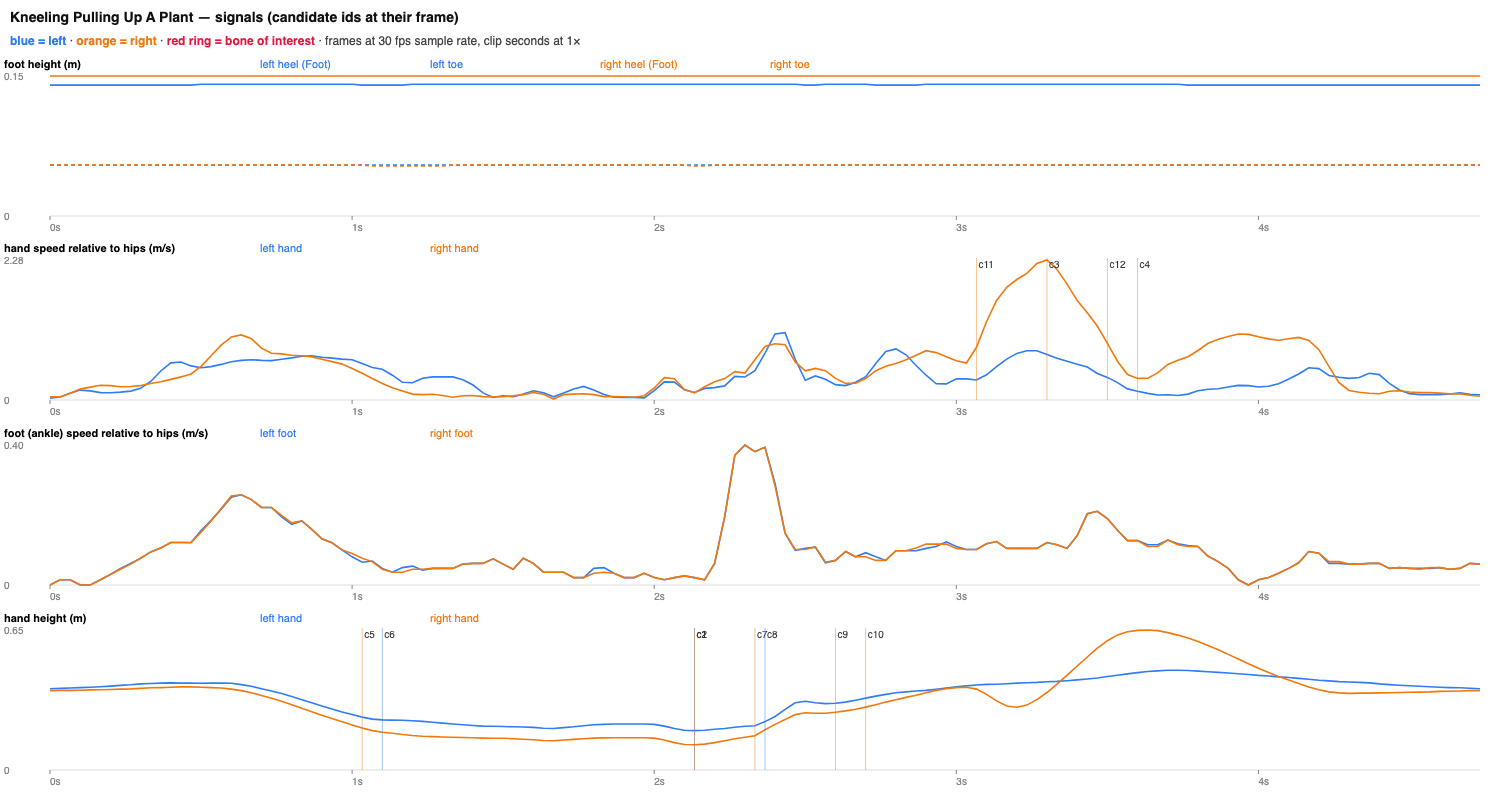
I baked world-space bone positions at 30 frames per second. Alongside those poses, I measured the duration, root movement, foot height, limb speed, and the difference between the first and last pose. These measurements suggested candidate moments; they weren’t annotations yet.
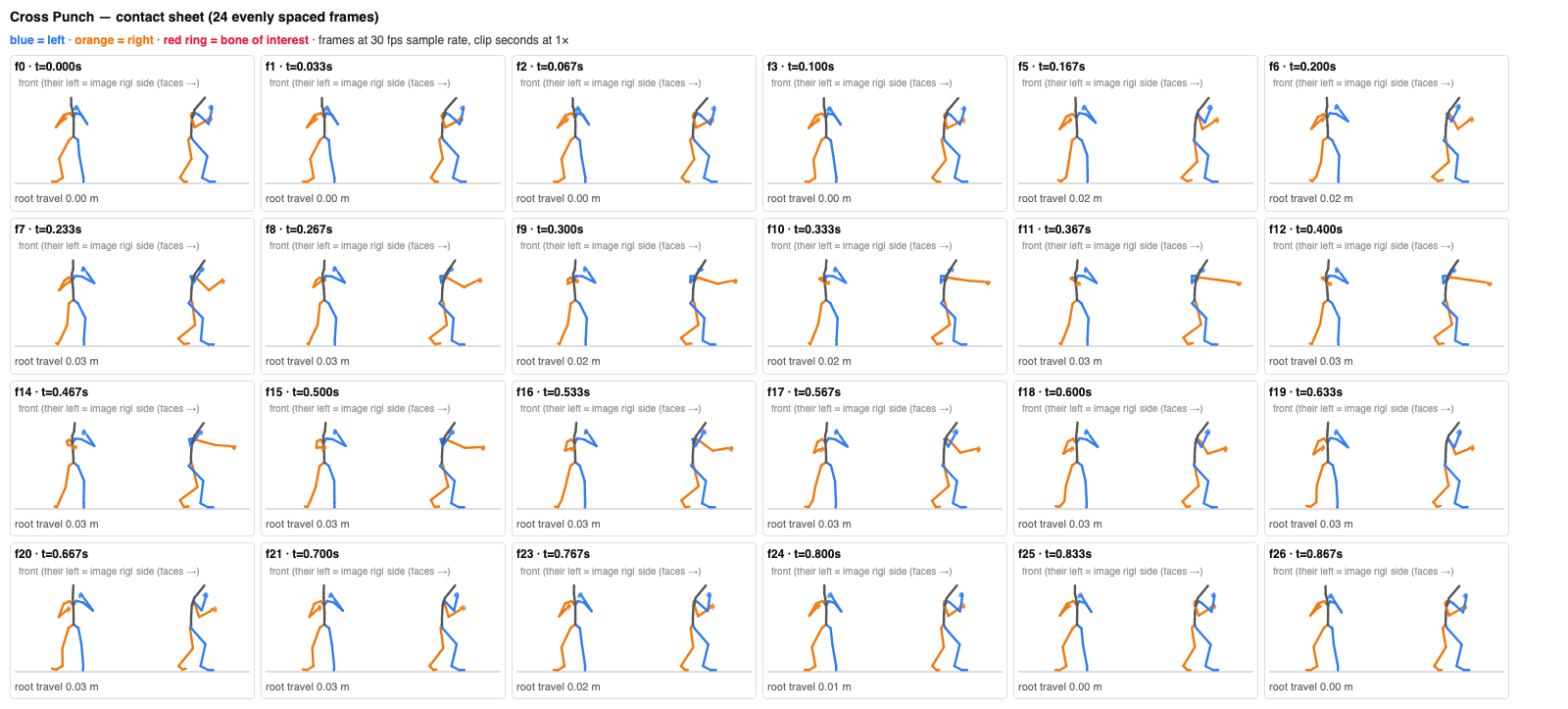
The next step was rendering the baked poses as stick figures. I produced a contact sheet for the whole clip, plots of the measured signals, a view of the loop boundary, and a strip of nearby frames for each candidate. The models and the report could work from the same evidence.
Then, ask the models to annotate it
Each annotation agent worked on one clip. It received the facts, visual evidence, and an output contract: describe the purpose and style, choose a usable segment, place markers, explain rejected candidates, and record checks and issues.
I started with Claude Opus 5.5 and GPT-6.1 Sol, then went back over the clips with Opus. For the larger batch, I mostly used Claude Haiku 5.5, with a few retries using GPT-6.1 Sol and Sonnet.
After the first annotations, I used GPT-6 Luna through Decisions, OpenAI’s version of Jev. I used it to review individual markers: whether to keep them, when they happened, whether two markers were the same event, and which tags were missing.
I tried using Decisions for the first pass too, but it rejected too many candidates. I went back to having an agent annotate the clip first, then used Decisions to review individual markers.
Example 1: grabbing before pulling
“Kneeling Pulling Up a Plant” made the difference between a candidate and an event much clearer. In v1, both grabs were placed at 2.133 seconds, the lowest point of the hands. But the hands had already reached the ground and stayed there for about a second before the pull.
| Time | Marker | Side | Confidence |
|---|---|---|---|
| grabright hand reaches the plant at ground level and stays put (grip assumed on arrival) | right | 63% | |
| grableft hand reaches the plant next to the right (grip assumed on arrival) | left | 60% | |
| otherpull begins: both hands at their low point, brace before the yank | both | 74% | |
| otherplant uprooted: hands leave ground level, torso jerks back | both | 67% | |
| releaseleft hand lets go so the right hand alone carries the plant into the toss (inferred, no prop) | left | 40%2.800–3.100s window | |
| throwright arm tosses the plant out to the side; fingers open by f102 | right | 64% |
This starts on v2 with v1 overlaid in faded lines. The earlier grabs are around 2.13 seconds; the revised grabs are near 1.1 seconds. Select v1 or v2 to inspect each set of markers, or open Versions for the recorded changes.
In v2, the right grab moved to 1.033 seconds and the left grab to 1.100 seconds. The old time became “pull begins,” and another marker at 2.333 seconds described the uproot. A left-hand release was added before the toss; the old right-hand release at 3.600 seconds was removed because it described the follow-through rather than a separate let-go.
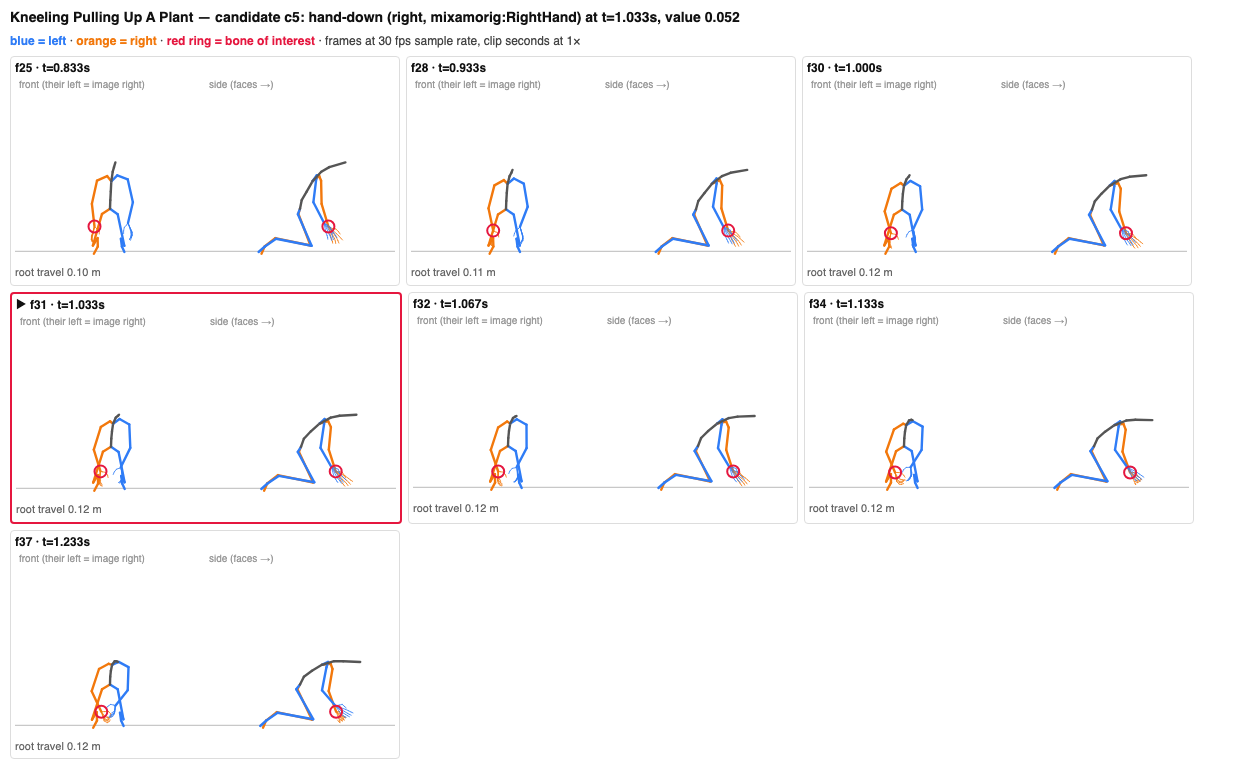
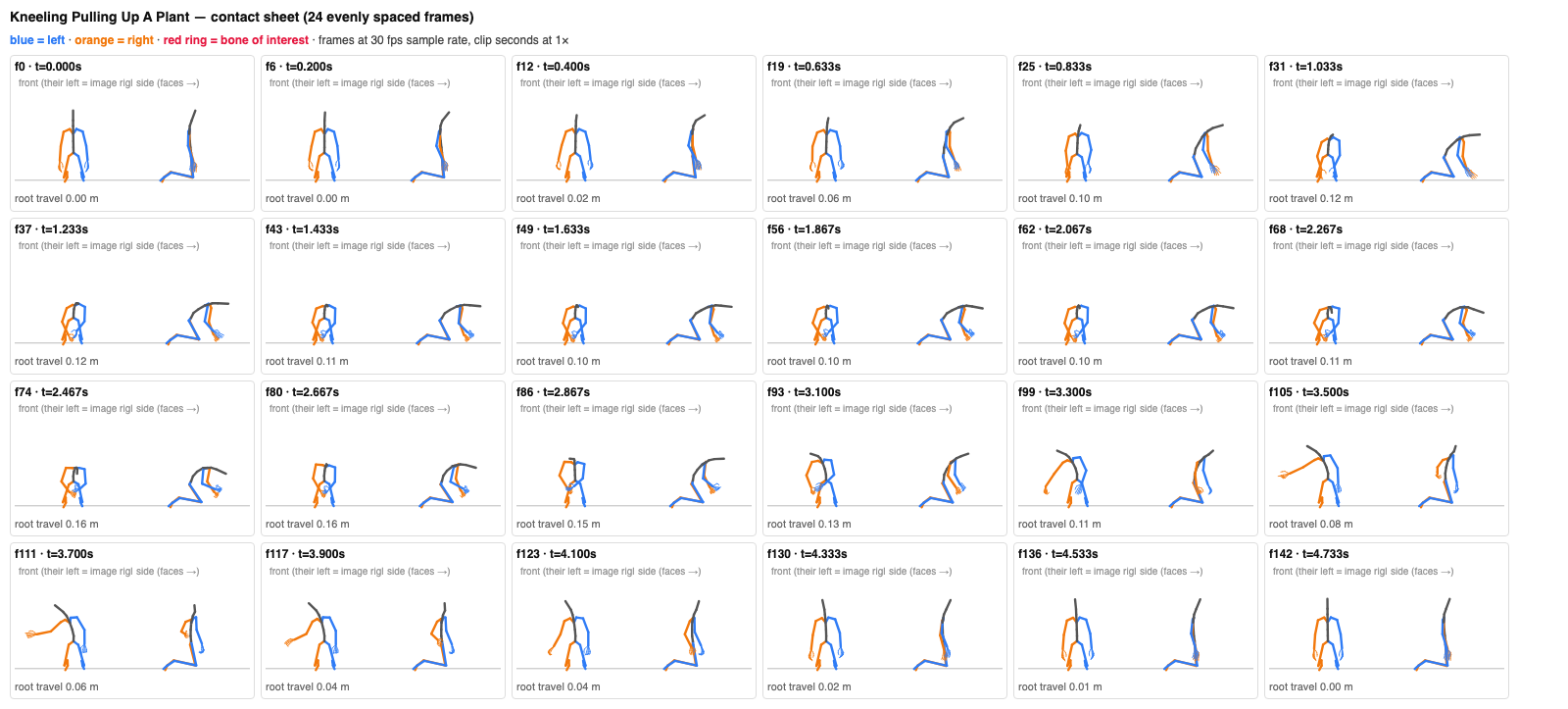
This changed four markers into six and separated reaching, pulling, uprooting, and throwing. The later Decisions passes kept those times but revised confidence. The left release remained uncertain, falling to 29% in v4. Keeping that uncertainty was more useful than treating every event as equally established.
Example 2: from an impact to an interval
Cross Punch shows why the annotation format changed. The first version placed an impact marker at 0.367 seconds. The next version described a right-hand hitbox interval instead: start at 0.167 seconds, end at 0.367 seconds. It also kept a later marker for returning to guard.
| Time | Marker | Side | Confidence |
|---|---|---|---|
| hitbox-hand-startcross leaves guard on its committed straight path | right | 78% | |
| hitbox-hand-endcross at full extension, before retraction | right | 84%0.300–0.400s window | |
| otherright hand back in guard (recovery done) | right | 55%0.700–0.800s window |
Try v1, then v2 with the previous-version overlay. The shaded orange band is the proposed active interval. Timing windows are shaded beneath their markers; low-confidence markers use dashed lines.
That interval is more useful for an attack than a single point. But it is still a proposal derived from the motion. The stick figures don’t establish collision volume, contact with another character, or how the attack feels in a game.
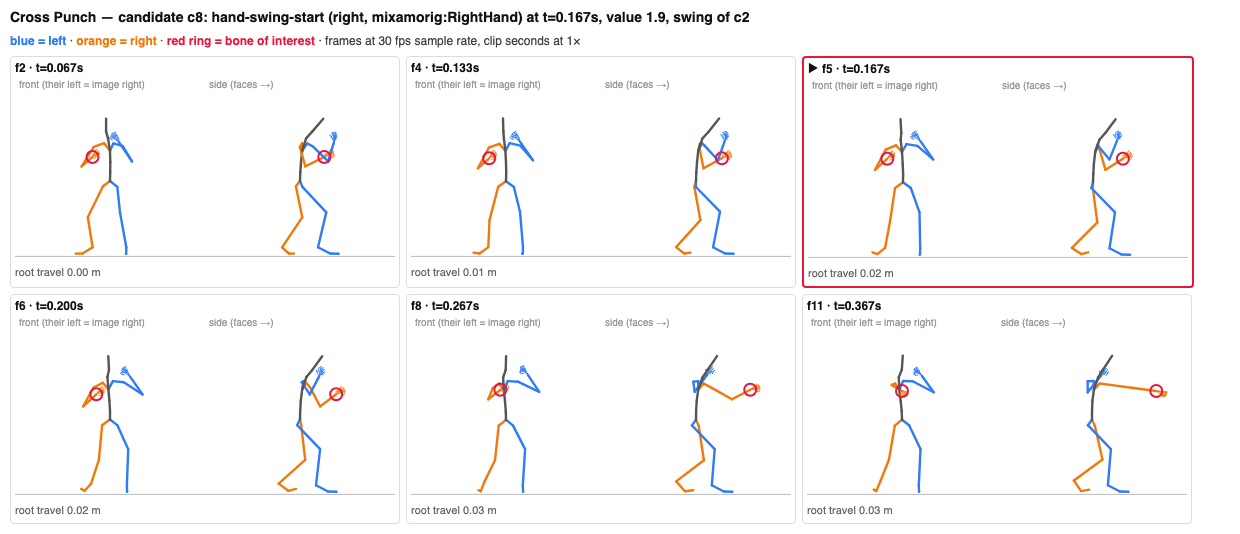
Later versions kept the interval and revised the review information. v4 cleaned the purpose tag from cross to punch-cross. It wasn’t a new animation or a new timing decision; it was a vocabulary correction, recorded separately.
Why I kept the versions
I froze the first annotations and wrote later passes as new files. Each revision points to the version it started from and carries a list of changes. That made it possible to compare the actual markers, rather than overwrite the earlier answer and lose the reasoning.
I validated the annotation structure, time bounds, candidate IDs, evidence files, and required checks. Those checks can catch a timestamp outside the clip or a missing image. They don’t establish that every interpretation is correct.
Cross Punch makes that distinction visible: the Decisions review changed its stored full-playback check from pass to fail. Rendered stills aren’t proof of a full playback test, and a later model pass isn’t automatically a better source of truth.
What I took from it
The bake-and-render step gave the rest of the work something concrete to refer to. Instead of debating a description of a movement, I could open its signal plot, a candidate strip, or the frames around a loop boundary.
I also came away with a clearer distinction between finding a candidate and accepting an event. A fast hand might be a punch, a guard adjustment, or recovery. The measurement finds the moment; the surrounding motion helps decide what it means.
The versions made mistakes and disagreements useful. I could see a grab move by about a second, a point marker become an interval, or a tag get cleaned without pretending the whole annotation had been redone.
The next check belongs in actual use: connect these markers to playback, movement, and attack logic, then see where the annotations hold up and where they need another pass.
All posts